Comparison
Gas vs Electric Vehicle Mileage Logs
Keep accurate trip records for gasoline and electric vehicles. Compare distance fields, consumption units, energy prices, and separate vehicle histories.
Updated 2 min read

Mileage Tracker is free to download.

Short answer
Both logs need a date, vehicle, distance, and trip category. The energy calculation differs: gasoline records often use litres per 100 km or mpg, while EV records use kWh per 100 km or miles per kWh. The basic travel record does not change when the powertrain changes.
Switching from a gasoline car to an EV changes the energy calculation, while the basic trip record stays familiar. Keep the journey details and vehicle assumptions separate so a familiar route does not inherit the wrong consumption or price.
We make Mileage Tracker, which supports gasoline and electric vehicles. The unit checks below also apply to a paper or spreadsheet log.
Same journey, different energy unit
| Record field | Gasoline vehicle | Electric vehicle |
|---|---|---|
| Distance | km or miles | km or miles |
| Consumption | L/100 km or mpg | kWh/100 km or miles/kWh |
| Energy price | Price per litre or gallon | Price per kWh |
| Trip category | Business or personal | Business or personal |
Details shared by both vehicle types
Record the date, distance, category, and any purpose required by your process. A recurring route can use the same template structure.
If you switch vehicles for a familiar trip, confirm the profile before saving so the distance lands in the correct history.
Gasoline and diesel consumption
Common units include litres per 100 km and miles per gallon. Cost uses the amount of fuel multiplied by the relevant price.
Fuel prices change, so a stored estimate should be read in the context of the value entered at the time.
Electric vehicle consumption
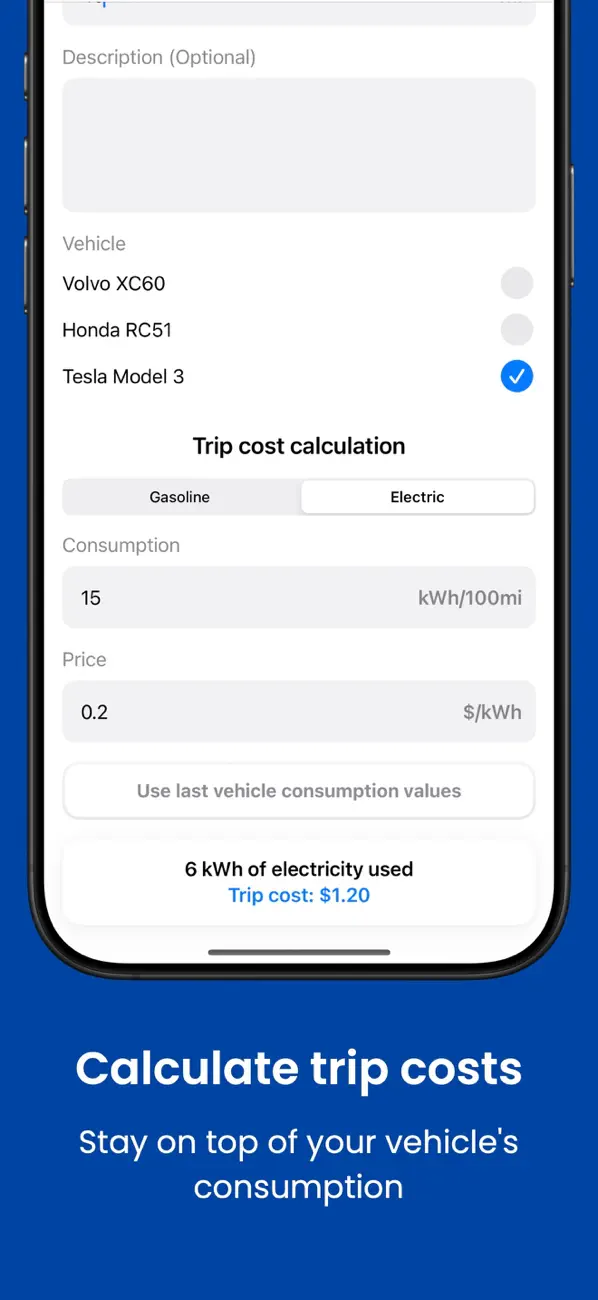
EV efficiency is often shown as kWh per 100 km or miles per kWh. Multiply estimated energy use by the electricity price that fits the charging situation.
Home, workplace, and public charging can have different prices. A simple trip estimate may not capture charging losses or blended tariffs.
For a household with one gasoline car and one EV, reuse the route only after selecting the right vehicle. A familiar distance can stay the same while the consumption unit and energy price change completely.
Keep each vehicle in its own history
Mileage Tracker supports gasoline and electric cars as well as motorcycles. It does not connect to the vehicle or import charging and fuel transactions.
Related reading: Manual vs Automatic Mileage Trackers · How to Use Mileage Log Templates for Recurring Trips · How to Calculate Fuel Cost for One Trip.