Comparison
The 4 Best MileIQ Alternatives for iPhone in 2026
MileIQ Unlimited now costs $139.92 a year. Here are four MileIQ alternatives for iPhone, what each one is best at, and how to choose between them.
Updated 3 min read

Rather log your trips than have your phone track them? Mileage Tracker is free to download.

Short answer
It depends on why you're leaving MileIQ. For free automatic tracking, Stride is the usual pick. Everlance adds tax filing, and Driversnote is built for employer reimbursement. If you'd rather log trips yourself and not be tracked at all, a manual log like Mileage Tracker is the simplest option.
MileIQ made automatic mileage tracking popular, and for a lot of drivers it still works fine. But the same two complaints keep coming up. It got expensive, and it records every single drive, so you spend time swiping away the trips you never wanted logged.
We make Mileage Tracker, one of the apps below, so we’re not neutral judges. We’ve tried to describe each option fairly and say who it suits, including when that isn’t our app.
Why people leave MileIQ
Price. MileIQ’s free plan stops at 40 drives a month. Unlimited costs $11.66 a month billed annually, which comes to $139.92 a year, or $13.99 if you pay monthly (MileIQ pricing, checked October 2026). For someone who drives for work a few days a week, that’s a lot for a log.
Every drive gets recorded. MileIQ tracks in the background with GPS and records “every business and personal drive” (App Store listing). The school run, the weekend trip, and the grocery stop all land in your log, and you sort them later.
Location stays on all day. Automatic tracking needs constant location access. Some people simply don’t want that on their phone.
If price is your only problem, another automatic tracker will probably do. If the other two bother you, a manual log is worth a look.
The alternatives at a glance
| App | How trips get logged | Background location | Best for |
|---|---|---|---|
| Stride | Automatic GPS tracking | Yes | Gig drivers who want free automatic tracking |
| Everlance | Automatic, in the background | Yes | Self-employed people who want tax filing help |
| Driversnote | Automatic once you reach driving speed | Yes | Employees claiming mileage reimbursement |
| Mileage Tracker | You add each trip, or reuse a saved one | No | People who drive the same routes and want a private log |
Stride: best free automatic tracker
Stride tracks mileage automatically with GPS and costs nothing. It’s built for gig and delivery drivers, so it also finds tax deductions, logs expenses, and offers health insurance. If you only want a mileage log, all of that can feel like a lot of app around one feature.
Everlance: best for tax filing
Everlance records drives in the background and sorts work trips from personal ones. Its Professional plan adds 1099 tax filing and audit protection. It suits self-employed drivers who want mileage and taxes handled in one place and don’t mind automatic tracking.
Driversnote: best for reimbursement reports
Driversnote starts recording once you reach driving speed and is designed around mileage reports for employers and tax claims. Salespeople, home care workers, and others who get paid back per mile tend to like it.
Mileage Tracker: best if you’d rather not be tracked
We built Mileage Tracker for people whose driving repeats: the same commute, the same clients, the same school run. You add a vehicle, then log each trip with its distance and mark it business or personal. Routes you drive often can be saved once and logged again with a couple of taps.
Because nothing runs in the background, the log only ever contains trips you meant to record, and the app never asks for your location. Each trip also shows what it cost, worked out from the distance, your car’s consumption, and the price of fuel or electricity. It handles several cars, motorcycles, and EVs, and syncs through iCloud.
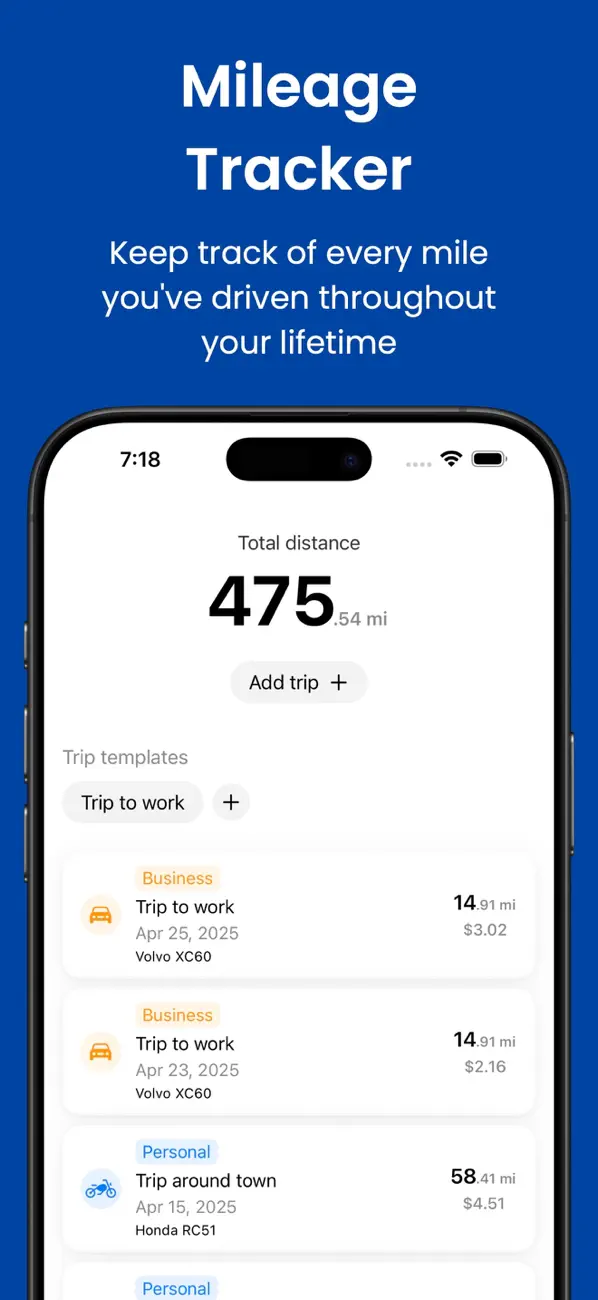
The trade-off is that you do the logging. If your routes change all day, with a dozen short stops, an automatic tracker will save you more time.
Manual or automatic: how to choose
Choose automatic tracking if you make lots of different short trips and you’re comfortable leaving location on.
Choose a manual log if most of your driving follows a few known routes. Logging a saved route takes less time than reviewing a week of detected drives, and you end up with a record that only holds what you put in it.
Whichever you pick, export your MileIQ history before you cancel, so you keep your past records.