Comparison
The 4 Best Caffeine Tracker Apps for iPhone in 2026
A look at the best caffeine tracker apps for iPhone in 2026, how caffeine builds up during the day, and which app fits what you want to change.
Updated 3 min read

Wondering if that afternoon coffee will keep you up? Caffeine Tracker is free to download.

Short answer
HiCoffee is the most complete caffeine tracker for Apple Watch and Apple Health users. Caffeine App adds water tracking, and Alyx is the most playful. If your goal is sleeping better without giving up coffee, pick an app that estimates caffeine left at bedtime, like Caffeine Tracker.
Most caffeine apps tell you how many milligrams you had today. That number is useful, but it doesn’t answer the question most of us actually have at 4 pm: will this coffee keep me up tonight?
We make Caffeine Tracker, which is one of the apps below, so take our ranking with that in mind. We’ve tried to say plainly what each app does well.
How caffeine builds up during the day
Your body clears caffeine gradually. The half-life, the time it takes to get rid of half of it, averages about 5 hours in healthy adults and ranges from 1.5 to 9.5 hours from person to person (NCBI).
Here’s what that means for one 150 mg coffee, using a 5-hour half-life:
| Coffee at | Caffeine left at 11 pm |
|---|---|
| 8 am | about 19 mg |
| 12 pm | about 33 mg |
| 2 pm | about 43 mg |
| 4 pm | about 57 mg |
| 6 pm | about 75 mg |
Later drinks add to whatever is left from earlier ones. In one sleep lab study, 400 mg taken 6 hours before bed still cut total sleep by more than an hour (Journal of Clinical Sleep Medicine). That’s why two people with the same daily total can sleep very differently: one had it all before noon, the other had a coffee at 5 pm.
So when you compare apps, check whether they show only a daily total or also what’s left in your system later in the day.
The apps at a glance
| App | What it focuses on | Apple Watch | Best for |
|---|---|---|---|
| HiCoffee | Large drink database, Apple Health insights | Yes | People deep in the Apple ecosystem |
| Caffeine App | Caffeine curve and water intake | Yes | Tracking caffeine and water together |
| Alyx | Bedtime forecast, “Last Call” alarm | Not listed | People who like playful charts and widgets |
| Caffeine Tracker | Caffeine left at bedtime, cutoff time per drink | No | Sleeping better without quitting coffee |
HiCoffee: best for Apple Watch and Health
HiCoffee is the most established caffeine app on iPhone. It has more than 2,500 branded coffee products, a calculator for homemade drinks, and support for Apple Watch, widgets, Shortcuts, Apple Health, and iCloud sync. It can also look at your resting heart rate and sleep data. If you want caffeine on your wrist and in Health, start here.
Caffeine App: best for caffeine and water together
Caffeine App shows a 24-hour caffeine curve, works out when you’ll be ready to sleep, and sends a notification at that time. It also tracks water with reminders and runs on Apple Watch. A good pick if you want one app for both.
Alyx: best for playful charts
Alyx keeps your log in Apple Health and offers a daily “Last Call” for caffeine, a bedtime estimate, and plenty of widgets, all with a deliberately silly personality. Several of those features are part of its paid tier, and it needs iOS 26.
Caffeine Tracker: best for protecting your sleep
We built Caffeine Tracker around that 4 pm question. You set your usual bedtime once, then log what you drink from a list of more than 2,000 drinks, from Starbucks and Dunkin’ to Red Bull and Monster. The home screen shows today’s total next to an estimate of how much may still be with you at bedtime.
The most useful part is the cutoff time: for a drink you’ve logged, the app shows the latest time another serving still fits your bedtime target. Instead of a warning after the fact, you know before you order.
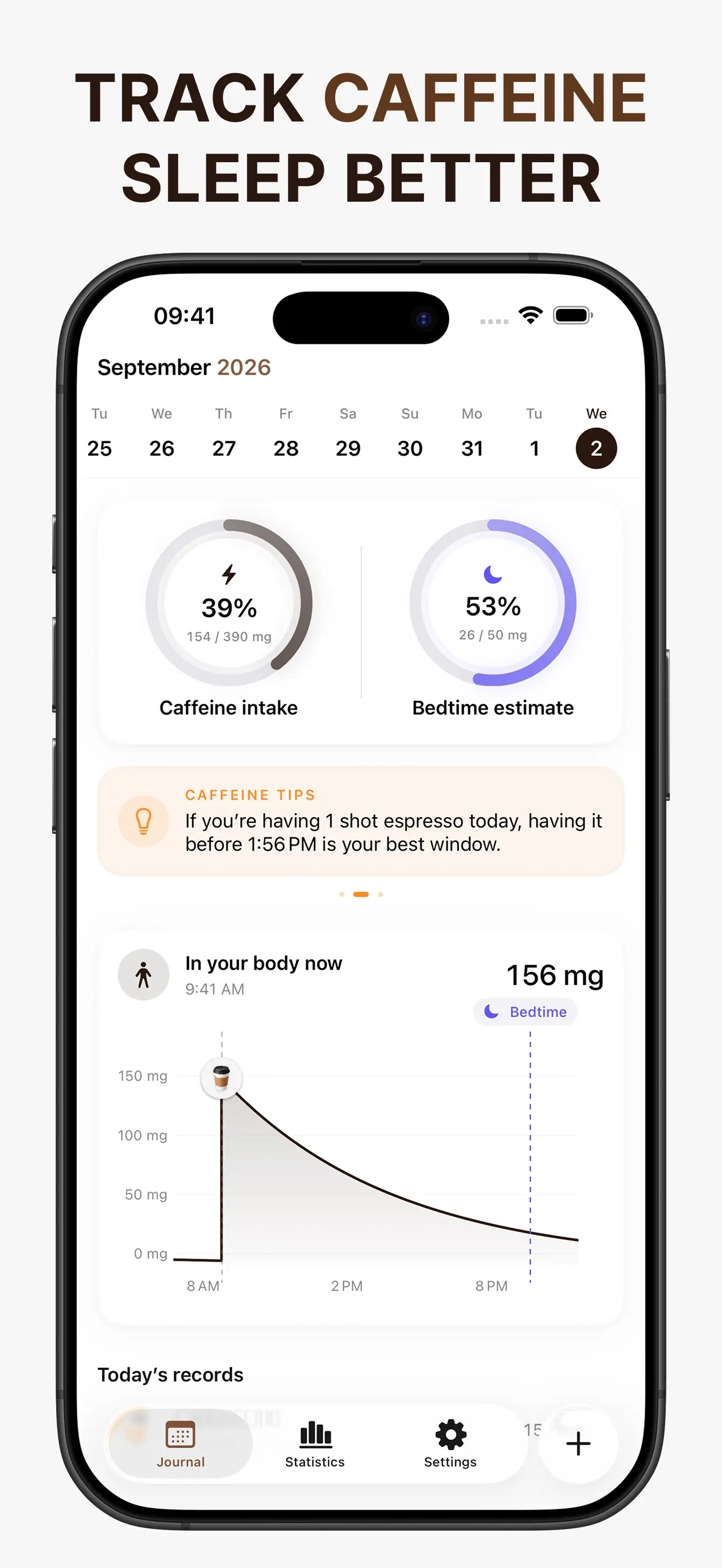
You can choose the half-life that matches you, and everything stays on your iPhone with no account. The trade-off: it doesn’t run on Apple Watch or read Apple Health, so if those matter most, HiCoffee is the better fit.
How to choose a caffeine tracker
Start with what you want to change. If it’s how much you drink overall, any app with a daily total will do. If it’s your sleep, pick one that estimates caffeine at bedtime.
Then check the drink list. You’ll only keep logging if your usual order is already there with the right serving size, so search for it before you commit.